

Disclosure. Codemagic paid me to do this migration and write about it. They get a review pass for factual accuracy, not for tone, and nothing here was changed at their request. Where I hit a problem and reported it, I say so; if it’s fixed by the time you read this, it’s described as fixed.
Update, 23 September 2026. Codemagic’s developers have worked through the issues I reported. Most are now fixed, including the iOS version-detection bug, the double-counted installs, the silent first run and the noisy debug command, and the docs now cover committed native projects and the crash-rollback budget. I’ve marked each one below where it comes up, and left the few that are still open as they were.
Update, 16 October 2026. The first native upgrade since moving to Patch (Expo SDK 58) built an Android release with no Patch configuration in it, and nothing reported an error. What happened and the one-file fix are in The first native upgrade.
In February I wrote about building my own Expo update server. It still works. maru, the community app I run, has taken every over-the-air fix through it since, on both platforms, for about a dollar a month.
It also means I own every piece of it: the database tables, the API endpoint, an admin command, a publish script, a shared secret, and a set of gotchas I learned one broken update at a time. When I sat down to plan this, I found that the script had been printing “Sent 0 push notifications” after every production publish since the day I wrote it, reading a field this server has never returned. Nobody noticed, least of all me. That’s roughly what running your own thing turns into.
So when Codemagic asked whether I’d try Patch, their open-source, self-hostable take on CodePush, I agreed on one condition: a real app rather than a demo. Real signing, real release process, committed native projects with hand edits in them, the lot. Most people moving off EAS Update are moving an app like that, not a fresh template.
This is how that went, with the rough edges left in.
What Patch is#
Patch is a server you run yourself and an SDK you put in your app. The server side is an API, a background worker, Postgres, S3-compatible object storage and a web dashboard, shipped as a Docker Compose stack. The client side is @codemagic/react-native-patch, a TurboModule for iOS and Android with an Expo config plugin, plus a CLI, cmpatch, that bundles your JavaScript and publishes it.
Two design decisions stood out once I’d read the source.
The first is that the app never asks the API whether there’s an update. When a release is published, the worker writes plain JSON manifests into object storage, and the app just fetches those. An update check is two static GETs against storage or a CDN; the API only receives metrics. My old endpoint was on the request path of every app launch. This one can’t be.
The second is that every release names the exact binary version it’s for, and the CLI computes a fingerprint of your native project and refuses to publish JavaScript onto a binary whose native code doesn’t match. My server had a version string and a lot of hoping.
Trying it on my laptop first#
The docs start you on a local evaluation stack, and that’s the right place to start.
npm install -g @codemagic/patch-cli
cmpatch selfhost local-eval up
The CLI installed in two seconds. The stack took 3 minutes 14 seconds the first time, most of it building the server and dashboard images locally, and in non-interactive mode it prints nothing at all while it does that, which looks exactly like a hang. (Since fixed: it now prints one progress line per step.) Then four healthy containers appeared, all bound to localhost: the dashboard on 8080, the API on 3000, Postgres, and MinIO on 9100. It sensibly avoided the ports my own stack was already using.
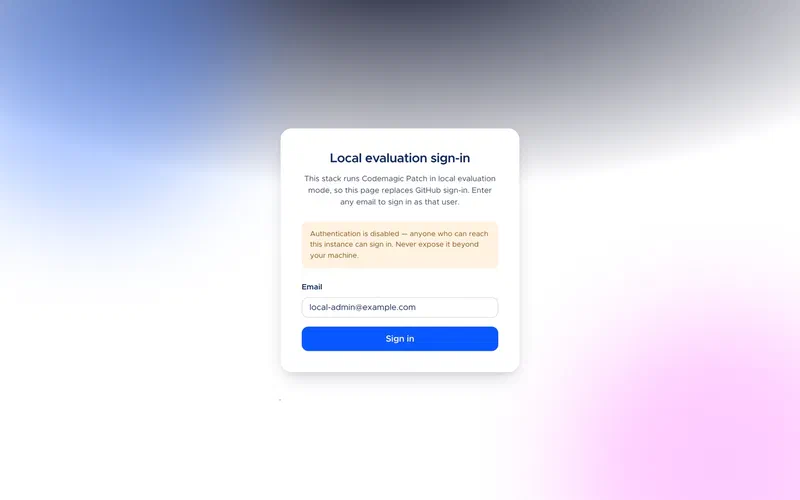
Sign-in is disabled in this mode, with a warning on every page not to expose it.
The stack comes seeded with an app called Example Data, which is worth a look before you’ve published anything, because it shows what the dashboard is for. The numbers in the next two screenshots are that seed data, not real users.
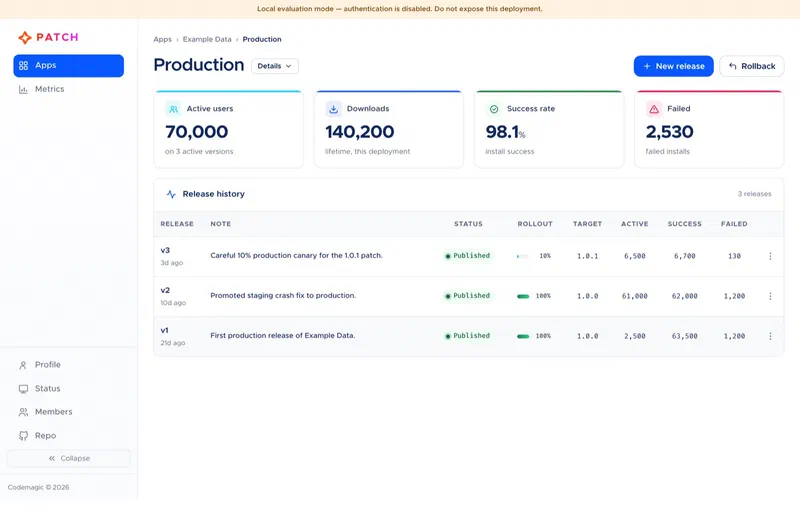
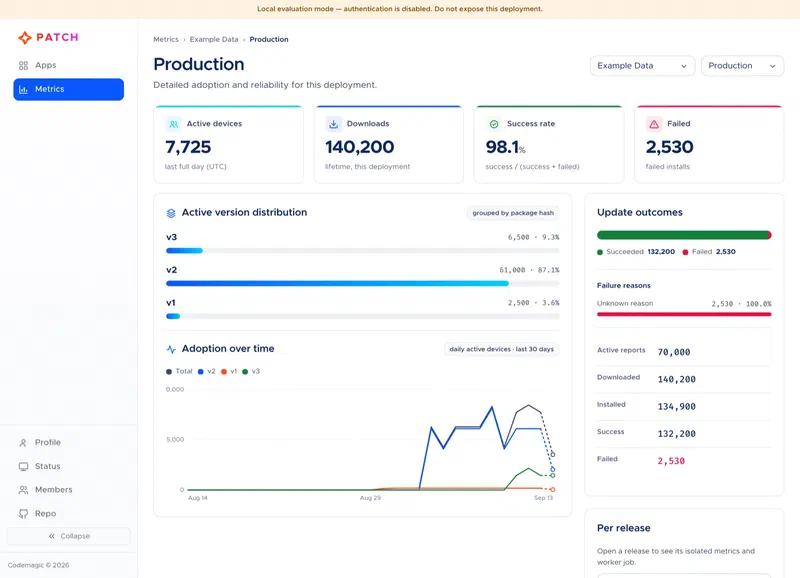
For comparison, my dashboard was an admin list of updates with an “active” checkbox. I had no idea how many phones had actually taken an update.
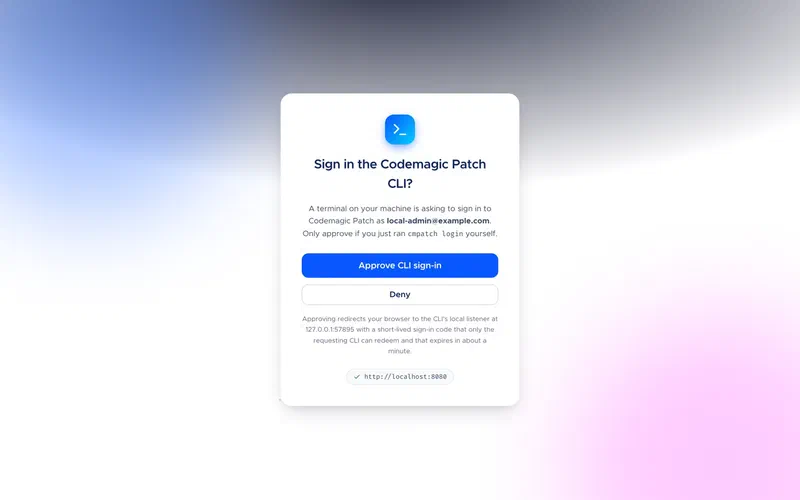
Logging the CLI in is a proper browser flow with PKCE and a localhost callback, and the approval page tells you which account is asking and that the code expires in about a minute.
Pointing it at a real app#
Patch wants one app per platform, each with a Staging and a Production deployment created for you. I made maru-ios in the dashboard and maru-android with cmpatch app create, mostly to see both. The dialog you get after creating an app is the most useful screen in the product for a migration: both deployment keys, the two URLs the SDK needs, and a note that deployment keys aren’t secrets.
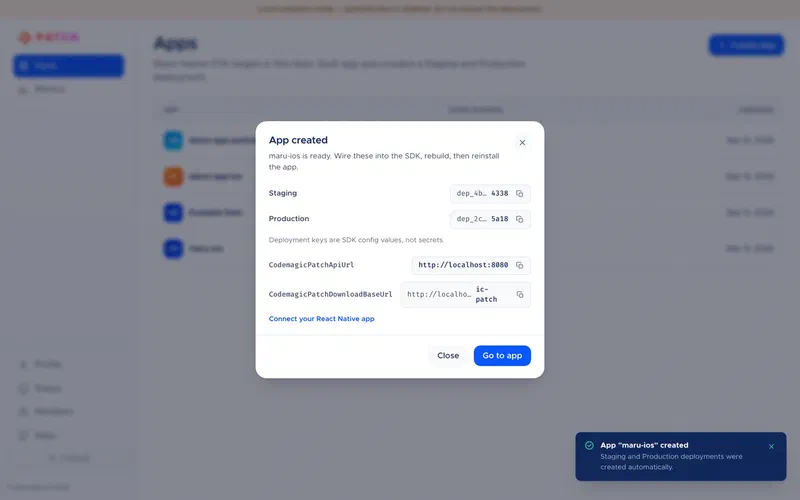
Two small things. cmpatch init linked a project to apps that already existed, so it couldn’t be the first command, whatever the migration guide implied. That’s since been fixed: in interactive mode it now creates one app per platform itself. And the dialog gives the API URL as http://localhost:8080 while the docs and the CLI say 3000. Both work, because each port serves both, but you’ll wonder.
Then I ran cmpatch doctor against the untouched app, and it found a real problem in three seconds. It reported the iOS binary version as 2.0.0. The app is 2.5.1.
The CLI finds every Info.plist under ios/ and, if none has “test” in its path, takes the first alphabetically. maru has a WidgetKit extension whose folder sorts before the app’s own, so the CLI picked the extension’s Info.plist. That plist was stale at 2.0.0, which is my bug, but the effect is nasty: auto-detection would target every iOS release at a version no phone runs, and nothing would error. Updates would just never arrive, which is exactly the failure I warned about in my self-hosting post. Android read versionName correctly. The workaround is to pass --target-binary-version or --plist-file, and my publish script now passes the version explicitly after checking that app.config.js and both native projects agree. Later, the same bug made doctor’s own manifest check fail against a deployment that was working fine, because it went looking for version 2.0.0’s manifest. Once I’d fixed my stale plist, doctor passed all 24 checks.
Codemagic has since fixed this. The CLI now reads the version from the app target’s Info.plist, not an extension’s, and if more than one target could be the app, cmpatch asks you which.
The JavaScript side#
Removing expo-updates and adding the SDK is a two-line change. Replacing what the app did with updates took more thought.
maru checks for updates on launch and whenever it comes back to the foreground, at most every fifteen minutes. If it finds one, it downloads it, and offers to restart; say no and it applies on the next cold start. There’s also a manual check in Settings that shows which bundle you’re running, and the error reporter tags every report with the update it came from.
The first thing I learned from the SDK source is that it looks up its native module at import time with TurboModuleRegistry.getEnforcing, which throws if the module isn’t there. maru also ships a web build, and a top-level import would take the web app down. So everything goes through one small module that loads the SDK lazily, with a .web.ts twin that returns nothing, which also keeps the SDK out of the web bundle entirely.
// ota.ts (ota.web.ts exports a patchSdk() that always returns null)
import { Platform } from "react-native";

type PatchSdk = typeof import("@codemagic/react-native-patch");
let sdk: PatchSdk | null | undefined;

export function patchSdk(): PatchSdk | null {
  if (sdk !== undefined) return sdk;
  if (Platform.OS === "web") return (sdk = null);
  try {
    sdk = require("@codemagic/react-native-patch") as PatchSdk;
  } catch {
    sdk = null;
  }
  return sdk;
}
The automatic check itself is mostly sync(), which never throws and resolves to a status:
const status = await patch.sync({
  installMode: "ON_NEXT_RESTART",
  mandatoryInstallMode: "ON_NEXT_RESUME",
});
if (status === "update-installed") offerRestart();
The SDK’s default for mandatory releases is IMMEDIATE, which reloads the JavaScript wherever the user happens to be. I changed it to apply the next time the app comes back from the background, because losing a half-written post is a worse bug than most fixes are good. At the time, InstallMode was a string union, not the enum object the docs’ examples suggested; it’s now exported as a constants object, so InstallMode.ON_NEXT_RESTART works as documented.
The native side, when you commit ios/ and android/#
The migration guide says to run npx expo prebuild --clean after adding the config plugin. I ran it in a separate checkout and it deleted bundled images, my Android network security config, the iOS privacy manifest and Podfile.lock, and reverted a test-runner fix in build.gradle along with a few hundred lines of Info.plist. Without --clean, Expo cleared both directories anyway.
This isn’t Patch’s fault. maru started as a managed Expo app and grew native customisations, so ios/ and android/ are committed and EAS builds them as they are. But plenty of apps look like that, and the guide didn’t warn you. It does now: the Expo migration guide has two paths, prebuild for generated native projects and the exact hand-applied changes for committed ones.
What the plugin actually changes turns out to be small enough to do by hand. On iOS, one import and one line in AppDelegate.swift:
return CodemagicPatch.bundleURL() ?? Bundle.main.url(forResource: "main", withExtension: "jsbundle")On Android, one import and one argument in MainApplication.kt (this is the React Native 0.82+ shape; older versions override getJSBundleFile() instead):
ExpoReactHostFactory.getDefaultReactHost(
  jsBundleFilePath = CodemagicPatch.getJSBundleFile(applicationContext),
  // ...
Plus three config values per platform and the removal of the old expo-updates settings: 13 lines added and 20 removed across both projects.
The plugin writes those config values as literals at prebuild time, which, with committed native projects, would mean one hard-coded deployment for every build. I wanted preview builds on Staging and store builds on Production from the same project, so the values come from the build environment instead. In Info.plist, Xcode expands build settings:
<key>CodemagicPatchDeploymentKey</key>
<string>$(PATCH_IOS_DEPLOYMENT_KEY)</string>
And in android/app/build.gradle:
def patchEnv = { name -> System.getenv(name) ?: (findProperty(name) ?: "") }
resValue "string", "CodemagicPatchDeploymentKey", patchEnv("PATCH_ANDROID_DEPLOYMENT_KEY")
The keys then sit in each eas.json build profile next to the EXPO_PUBLIC_ values. An empty value means the SDK quietly does nothing, which is fine for a local build and a disaster for a store build, so app.config.js now throws if a preview or production EAS build is missing them or still points at localhost.
The first update#
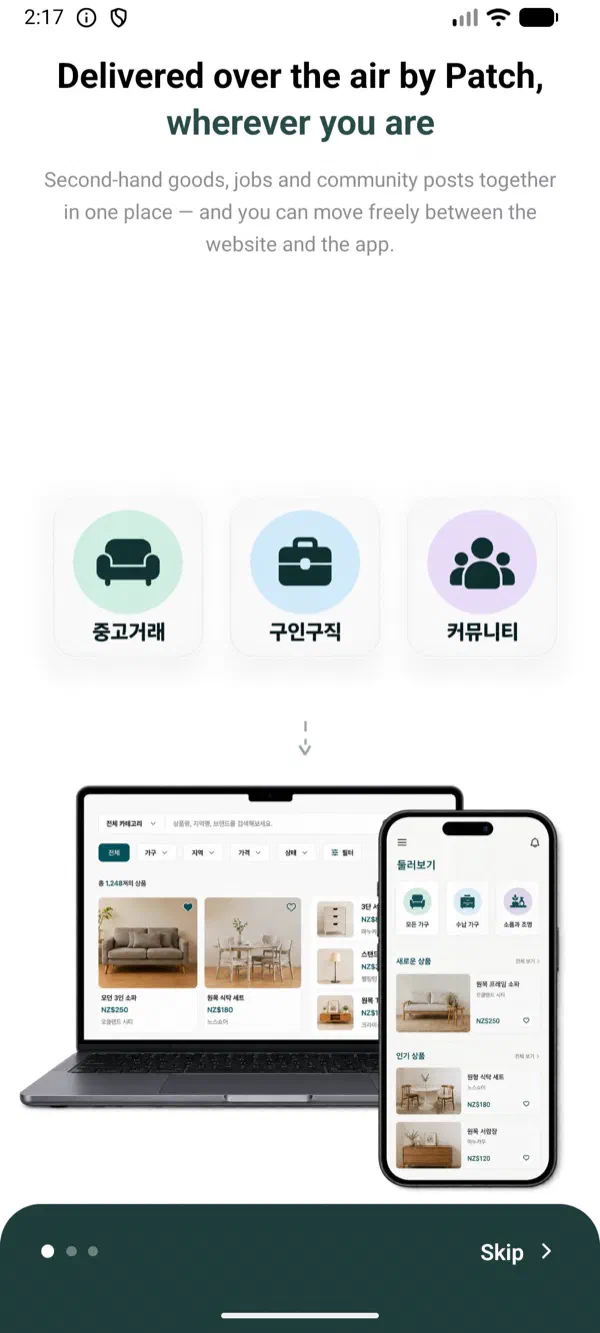
For the first release I changed the onboarding headline, which you can see without signing in, and published it:
./scripts/publish-update.sh ios --notes "Onboarding headline over the air"That took 30 seconds, most of it Metro and Hermes. The server’s worker published the manifest 0.6 seconds after the upload finished. The update is a 7.3 MB compressed tarball, against the 11 MB Hermes bundle plus assets my old export produced.
One thing to get right here: the JavaScript bundle inlines your EXPO_PUBLIC_ values when it’s built, so an update has to be built with the same values as the binary it lands on, or you ship JavaScript that talks to the wrong backend. My script loads them from the same eas.json profile that built the binary. Patch’s CI docs now spell this out too, along with the fact that release-react doesn’t read EAS profiles itself.
Then I relaunched the app. The device log showed the whole update check as two requests to object storage, meta.json and 2.5.1/manifest.json. The SDK wrote a Downloaded event three seconds after launch and staged the update, and the app offered a restart.
The bug was mine#
Then I looked at the dashboard. One simulator had installed release v1, and it showed two successful installs and two active users.
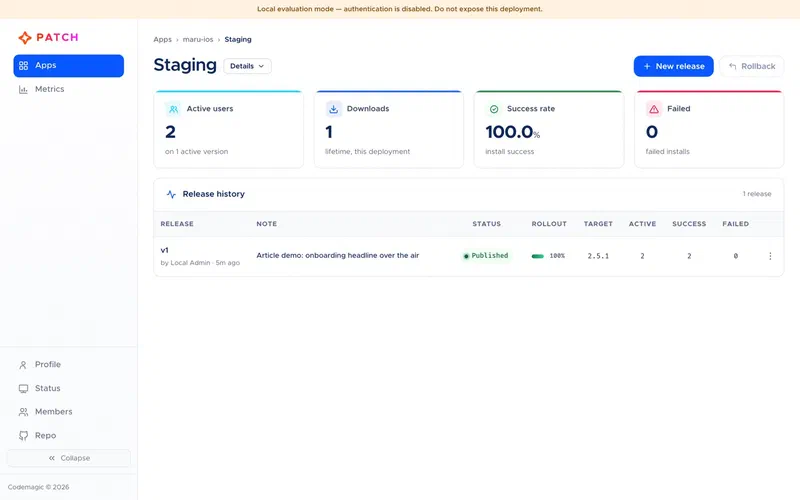
The SDK keeps its state and pending metric events as files in the app’s container, which made this easy to chase. There were two Success events with identical timestamps and different ids. My hook confirmed the running bundle with notifyAppReady() on mount, and then called sync() straight away, and sync() calls notifyAppReady() itself. The two calls overlapped, each saw the release as pending, and each recorded the events. The server de-duplicates on event id, but these had different ids, so both counted, and those duplicates are permanent.
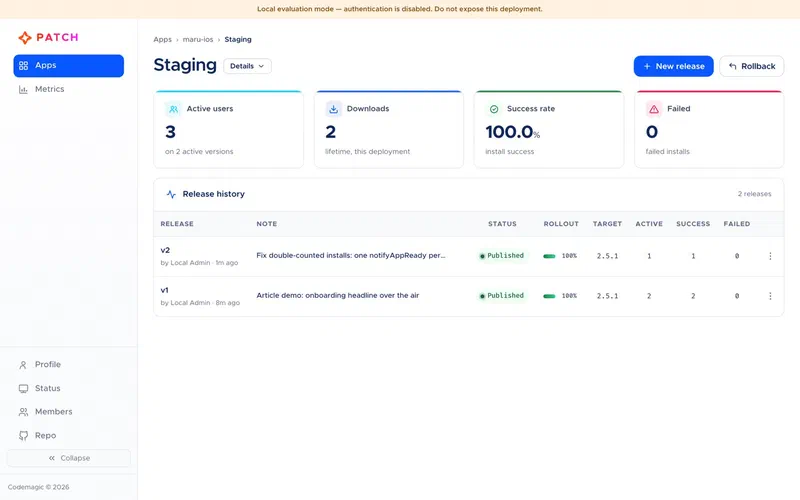
The fix on my side was one shared confirmation per launch that everything else awaits. The SDK could also guard against overlapping calls itself, and I suggested that. It now does: overlapping notifyAppReady() calls, including the one inside sync(), share a single confirmation, so each install is recorded once. The SDK reference also now says that sync() confirms readiness itself, so an app that uses it doesn’t need to call notifyAppReady() separately.
The nice part was shipping the fix. It’s a JavaScript-only change, so it went out as release v2, and because a device on v1 can be sent a binary diff, v2 downloaded as a 543 KB patch instead of the 7.3 MB bundle, about 7% of the size. After the restart: one download, one install, one success, one active device.
Breaking it on purpose#
Rollback is the feature I cared about most, because my old setup had none on the device. A bad update would have crashed every launch until I noticed and un-ticked a checkbox.
So I released a v3 that throws before the first render, which means it can never call notifyAppReady(). The app downloaded it, offered a restart, and died to the home screen.
The next launch booted v3 again and crashed again, which surprised me, because the docs say a bundle that crashes before notifyAppReady() is rolled back. The source explains it: the SDK allows three unconfirmed launches before deciding it’s a crash, because one unconfirmed launch can just mean iOS killed a healthy process before any JavaScript ran. The fourth launch came back up on v2.
The device then reported the failure itself, as crash_rollback, and the dashboard showed it against v3. That’s a sensible design, but it’s worth being plain about what it means: a bad release costs each user three crashed launches before they recover, and at the time the docs didn’t mention the number. They do now, and the budget is configurable, with CodemagicPatchMaxLaunchAttempts natively or the Expo plugin’s maxLaunchAttempts. That’s the case for Staging first and a small Production rollout second.
Stopping a bad release for everyone else is one command, and it took under a second:
cmpatch release rollback --app maru-ios --deployment StagingIt doesn’t rewrite history. It publishes the previous release again as a new one (v4, marked as a rollback of v2), so the crashing release stays in the list with its failure count, which is the honest record. The dashboard does the same from a dialog.
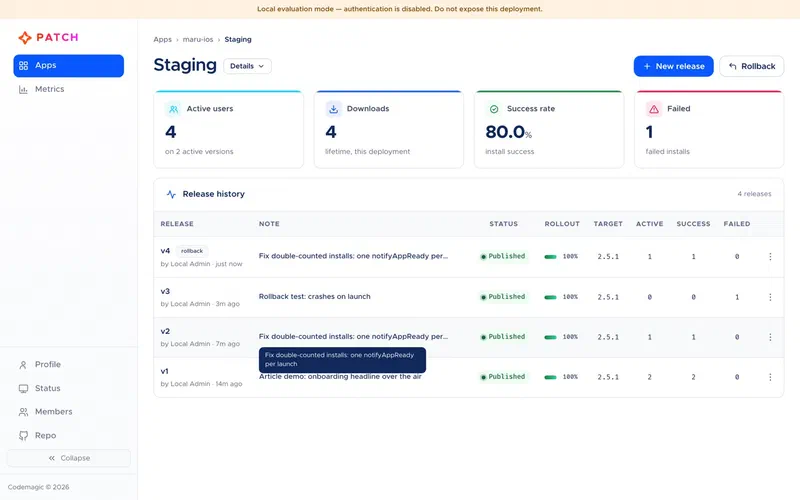
Android#
Android had two surprises, neither Patch’s. The R8 keep rule I’d added for the SDK lived in app.config.js, which only reaches the native project through prebuild, so my first release build accidentally tested whether the SDK survives R8 without one. It does: R8 renamed all its classes, and updates downloaded, installed and rolled back fine. And the emulator, freshly cold-booted with Gradle still holding memory, was so slow that my first test gave up 45 seconds before the SDK finished the download it had already started.
Release v1 applied, with one success and one active device, and a crashing v2 rolled back after the same three-launch budget.
Past the happy path#
Updates arriving and rolling back is the core of it, but a team lives in the other features, so I went through them one at a time.
Staged rollouts are deterministic, which I liked. A device is in if the first eight hex digits of md5(deviceId + "-" + releaseLabel), modulo 100, are below the rollout percentage, so the same phone stays in or out for a given release. I worked out that my simulator sat in bucket 91 for the next release, published it at 25%, and the simulator correctly got nothing. Raised to 95% with cmpatch release patch, which took under a second, it updated on the next launch.
Then my next release failed with a 409: “deployment has an active rollout below 100 percent”. Only one partial rollout per deployment is allowed, so you finish, disable or roll back a canary before shipping anything else. That’s reasonable, and documented, but a pipeline that publishes on every merge will run into it in the middle of a canary. Since I reported it, the CLI explains itself here: if an active partial rollout is blocking you, it says waiting won’t help and how to complete or disable the rollout, and if another release job is still running it tells you to wait with release inspect --wait. The docs now have a section on sequential release changes.
Mandatory releases use the SDK’s mandatoryInstallMode. With mine set to apply on the next resume, the app downloaded the update and showed its prompt, and when I ignored the prompt, sent the app to the background and brought it back, the new version was simply there.
Disabling a release does more than stop offering it. The moment I disabled the latest one, the manifests pointed at the newest release still enabled, and devices on the disabled one were offered a patch back to it. Disable everything for a binary version and the manifest’s target becomes null, and the SDK reverts the app to the bundle it shipped with. My update hook didn’t prompt for that case at first, so now it does.
Promoting from Staging to Production took under a second and reused the exact package that was tested, same hash and notes, rather than rebuilding it. It also accepts a rollout percentage, so “promote to 10% of Production” is one command.
Building and publishing can also be separate steps. cmpatch bundle produces a .cmpatch artifact, and the dashboard’s “Bundle upload” option reads it before uploading: platform, target version, fingerprint, signing status, size and bundler. That suits a setup where CI builds the artifact and someone else decides when to publish it.
That’s also where I ran into the fingerprint guard in earnest. After I fixed my stale widget plist, the server refused my next release with a 409, because the native project’s fingerprint no longer matched the one it had recorded for 2.5.1. On Android, editing a comment in app.config.js was enough, since Expo includes the app config in the fingerprint. The dashboard shows the same check as a warning with both fingerprints and an “Upload anyway” button. In both cases nothing native had changed on the installed binary, so overriding was right. In real use, though, the honest answer is nearly always a version bump and a store build, and my publish script now says exactly that when it happens.
Code signing is RS256: the CLI signs the package hash with an RSA private key, and the SDK checks it against a public key compiled into the binary. The key goes in as a single base64 line, which fit my build-setting approach, and I tested it on both platforms. With the key in the app, an unsigned release was refused before it downloaded. With “require code signing” turned on for the app, the server rejected an unsigned publish with an error that named the fix and linked the guide. A signed release installed, and the SDK recorded the signature as verified. It also refused an older unsigned release the server fell back to when I disabled the signed one. The catch is that the public key has to be in the first binary you ship, because an update can’t add it.
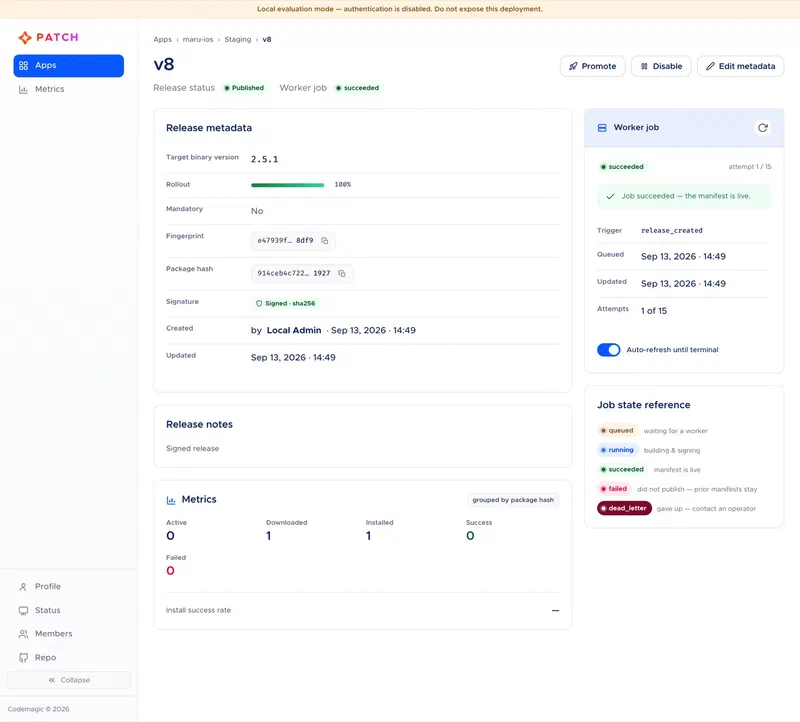
Teams and CI are covered as well. Members get one of four team-wide roles (owner, admin, developer, viewer) and invitations wait until the person first signs in. Personal access tokens worked with an empty home directory, passed either as --token or through environment variables, and the token list shows when each was last used. I’ve also written a manually triggered CI workflow that runs the same publish script on a Linux runner with the signing key from a secret, though I haven’t run it yet, since it needs the hosted server.
One tool I’d have skipped at the time is cmpatch debug ios. It streamed the system log filtered on “OTA” case-insensitively, which matches “Rotation”, so a twenty-second app launch produced a screenful of SpringBoard messages and nothing from the app. That’s fixed: it now shows only lines carrying the SDK’s markers. The SDK doesn’t log much on its own, mostly errors and development-build warnings, so expect a quiet stream. The getpwuid_r warning you may see comes from xcrun simctl, not Patch.
How hard is it, really#
Codemagic asked for my opinion, so here it is, as plainly as I can put it.
Trying it out is easy. Two commands, a few minutes, and you have the real server, a dashboard with demo data, and a CLI you can point at your own app. I’d rate it the best part of the first hour.
Integrating the SDK is moderate work, and most of the difficulty is in your own project rather than in Patch. On a fresh Expo app with generated native folders, it really is the plugin plus a few lines replacing expo-updates calls. On an app like maru, with committed native projects, a widget extension, a web build, R8 and build profiles, the work was in the edges. I had to apply the native changes by hand to avoid prebuild, make the configuration build-time so Staging and Production builds could differ, and keep the SDK away from web. I also had to make sure the JavaScript in an update was built with the same environment as the binary. None of it was hard once I understood it. When I did it most of that wasn’t in the docs, though the committed-native-projects path and the bundle-time environment now are.
Day-to-day use is good. Publishing is one command and about half a minute. Rollouts, promotion, disabling and rollback are all under a second from the CLI or the dashboard, and the errors say what went wrong and what to do. The server’s guards (the fingerprint check, one canary at a time, signing) are strict in ways that stopped me doing the wrong thing more than once.
Running it in production is the bigger commitment. It’s a Docker Compose stack with Postgres and object storage that you have to host, back up and upgrade, and it needs two domains and an OAuth app. For a team already running servers that’s a quiet afternoon. For a team on EAS precisely because they didn’t want servers, it’s the real cost of switching, more than the SDK work.
In wall-clock terms, I installed the CLI at 12:29 and had the first update applying on a simulator at 13:34, and half an hour of that was an Xcode build that stalled for reasons unrelated to Patch. Everything in this post, on both platforms, was done by mid-afternoon, not counting the hosted server.
The things that cost me the most time, in order: expo prebuild --clean wiping my committed native projects, and then working out how to wire everything by hand; the iOS version-detection bug, which would have sent updates to a version nobody runs; the double-counted installs, which were my own doing but easy for anyone to repeat, since sync() calls notifyAppReady() itself; and the undocumented three-launch crash budget, which surprised me halfway through a test. After those came things that are correct but need planning: the fingerprint guard firing after harmless native-adjacent edits, one canary at a time per deployment, and lifecycle jobs that can’t overlap, which matters as soon as a script does several things in a row. The rest was small: a silent first-run setup, a noisy debug command, and a few docs examples that didn’t match the code.
I wrote all of it up for Codemagic, with the details, and by 23 September most of it was fixed: the version detection, the overlapping confirmations, the prebuild warning, the crash budget, the silent setup, the debug command, the InstallMode examples, and the error you get when a release job or a canary is in the way. What’s still open is smaller: the dashboard showing the API on :8080 while everything else says :3000, the SDK throwing on import on web and in Jest, and a few docs gaps.
Going to production#
Everything above ran against the evaluation stack. Production is the same app and the same scripts pointed at a real server, and this is the plan for maru.
The supported way to run the server is the Docker Compose install: a Linux machine with ports 80 and 443 open, two domains (one for the API and dashboard, one for downloads), and a GitHub OAuth app for sign-in, which the server won’t start without. The installer does the rest, including TLS:
scripts/selfhost/install.sh \
  --api-domain updates.example.com \
  --storage-domain storage.updates.example.com \
  --email [email protected] \
  --github-oauth-client-id <id> --github-oauth-client-secret <secret>
It writes a .env.selfhost with the database and storage secrets, which belongs in your password manager.
You don’t have to use the bundled database and storage, though, and that’s what makes it fit a stack like mine. maru’s API already runs on Fly.io and its files live on Tigris, and Patch works on both. Underneath the Compose file, the server is one container running in MODE=all (API and release worker together) that needs a Postgres database, S3-compatible storage and a public HTTPS URL for the files. That’s a Fly app built from the repository’s Dockerfile (there’s no published image yet, so fly deploy builds it), a Fly Postgres database, and a Tigris bucket:
MODE=all
DATABASE_URL=postgresql://…            # Fly Postgres
STORAGE_ADAPTER=s3
S3_ENDPOINT=https://fly.storage.tigris.dev
S3_REGION=auto
S3_BUCKET=myapp-patch
S3_FORCE_PATH_STYLE=true
PUBLIC_BASE_URL=https://myapp-patch.fly.storage.tigris.dev/codemagic-patch
Two caveats. Running it outside Compose is documented in the repository as reference material, not a supported path in this first open-source release, so on Fly you’re on your own for upgrades and backups. I haven’t deployed it that way yet either; this is the plan, not a report. And if you’ve read my post on Fly’s scale-to-zero, keep at least one machine running. Phones never wait on the API for an update check, since manifests come straight from storage, but every metrics upload and every release job would otherwise start with a cold boot.
Tigris is the part I’m most keen on. It’s where maru’s files already are, and it puts a CDN in front of the URL every app launch hits. Mind the manifest caching if you do this: with the plain base-URL delivery adapter Patch serves manifests as no-cache, because it can’t purge a CDN, and a manifest cached on its own TTL would keep serving a release you’ve just rolled back. The configuration reference now documents this under MANIFEST_CACHE_CONTROL, and the docs site covers S3-compatible storage.
On the hosted server you create the apps again, put the new keys in the preview and production profiles in eas.json (Staging keys and Production keys), and create a token for publishing:
cmpatch token create --name ciIf you want code signing, decide now: generate the production key pair, keep the private key as a CI secret, put the public key in the build profiles, and turn on “require code signing” for both apps. The first Patch binary also needs a new version number, because the binaries already in the stores run expo-updates. Build it with the preview profile for TestFlight and Play internal testing first, and check the keys actually made it into the built Info.plist and Android resources before handing it to anyone. That’s the one link my local tests didn’t exercise, since I exported the environment by hand. Then publish to Staging, confirm one download and one success per tester, and only then build for the stores.
Production releases start small and grow:
./scripts/publish-update.sh ios --production --rollout 10
cmpatch release patch --app maru-ios --deployment Production --label v1 --rollout-percentage 100
The old server stays up in the meantime. Every copy of 2.5.1 that people haven’t updated still checks it, and hotfixes for them still go through the old script. Once the logs show those requests have stopped, the old server, its publish script and its secret can all go.
The first native upgrade#
Added 16 October 2026.
Patch has been carrying maru’s production updates since early October. The first native release since then was the move to Expo SDK 58: React Native 0.88, and on Android a new major version of the Gradle plugin. A native change can’t go over the air, so it’s a new binary, 2.6.0, and my publish script refuses to send 2.6.0 updates until that binary exists. Both platforms built cleanly the first time.
The production section above says to check the keys really made it into the built Info.plist and Android resources before handing a build to anyone. This time I did, and that check is the reason this section exists. The iOS build had its four Patch settings. The Android build had none:
bundletool dump resources --bundle=build.aab --values | grep -A1 "string/Codemagic"That command printed four keys for the 2.5.11 build and nothing for 2.6.0. The environment wasn’t the problem: Gradle’s generateReleaseResValues writes all four. They’re removed later by the release resource shrinker, which in Android Gradle Plugin 9 is much more aggressive. The same app went from 9,240 resources to 7,116. The SDK reads its configuration by name with getIdentifier, which the shrinker can’t see, so it removed the four strings as unused. A missing string reads as empty, and empty means “no updates”. Nothing would have failed. Android 2.6.0 would have installed, run normally and never received an update, and the only sign would have been no Android 2.6.0 devices on the dashboard.
The fix is one resource file that tells the shrinker to keep the four strings:
<!-- android/app/src/main/res/raw/codemagic_patch_keep.xml -->
<resources xmlns:tools="http://schemas.android.com/tools"
    tools:keep="@string/CodemagicPatch*" />
Don’t call it keep.xml: React Native’s bundle task already generates a raw/keep.xml for your JavaScript assets (which is why images and fonts survived), and the two would collide. The better place for this rule is the SDK itself, since a library’s keep file is merged into the app automatically, and a warning when a release build starts with no deployment key would turn the silent case into a visible one. This is the same kind of failure as the iOS version-detection bug earlier: nothing errors, and the updates just never arrive.
The same check turned up a second problem that has nothing to do with Patch, and it’s worth knowing for a different reason. The Android release build crashed on launch, twice, for two separate reasons inside Expo’s own modules. First, Expo’s widgets module failed to register its native classes, so the app died before any JavaScript ran. With that fixed, the app got as far as starting its JavaScript and then stopped, because three modules that had moved to Expo’s new module system were never registered. Patch’s crash rollback can’t help with either, because there is no update to roll back. It protects you from a bad update, not from a bad binary. A native upgrade still has to be installed and opened on a real device or emulator before it goes to the store, Patch or no Patch.
One smaller thing came out of the same testing. When sync() fails, it returns "error" and keeps the reason to itself unless the app is running in development, so a release build can only log that something went wrong. My hook now calls checkForUpdate() once after a failed sync and logs what that throws, which is how I learned that a local simulator build had empty Patch URLs (unsupported URL) rather than a broken server. It would help if the last error were readable in release builds too.
My checklist for a native release now has three lines it didn’t have before: dump the Patch settings from the built .ipa and .aab, compare the deployment keys with the build profile, and launch the release build itself, not a debug build, before submitting.
What I’d tell someone with an Expo bill#
If you’re paying for EAS Update because building a server looked like too much work, Patch is a real answer: you run a server, but it’s a Compose stack and an installer, not code you maintain. Compared with what I built, you get staged rollouts, per-release install and failure numbers, binary patches, a fingerprint guard, code signing, crash rollback on the device, and a rollback button. I had built none of those.
What it costs: a new binary before anyone gets a Patch update, since the SDK has to be in the app; a server to keep upgraded and backed up; three crashed launches per user by default when a release is bad enough; and some hand work if your native projects are committed. It’s also young. This was version 0.3.0, and I hit a version-detection bug, a noisy debug command and a few gaps in the docs, and made a bug of my own that the SDK could have prevented. The version detection and the debug command have since been fixed, most of the docs gaps filled, and the SDK now guards against the mistake I made. None of it stopped the migration, and all of it was visible, in the CLI, in the dashboard, or in the SDK’s own files on the device, which is more than I can say for my old setup.