

AWS released AWS Emulator on 11 November 2026. It’s a local copy of the AWS APIs that you run on your own machine. It’s free, it needs no AWS account, the code is public domain (CC0), and it covers more than 200 services. It arrived seven months after LocalStack started requiring an account and an auth token for its current image, so a lot of people are looking at it as the free LocalStack alternative they’ve been waiting for.
This post is mostly the setup: Docker on a Mac or Windows machine, the Linux package, the environment variables that point the AWS CLI and boto3 at it, Docker Compose, pytest and GitHub Actions. I ran every command here myself, on version 1.0.342. After the setup comes what it got right and wrong when I pointed the S3 tests from two of my own projects at it, side by side with LocalStack 4.12, Moto and Floci. The two projects are the upload flow in my marketplace app, and the bucket a self-hosted Codemagic Patch server keeps OTA bundles in.
AWS Emulator in one minute#
AWS doesn’t publish a container image. You build one from a nine-line Dockerfile that installs their Linux package, run it on port 9297, and set a handful of environment variables. From then on your SDK talks to the emulator instead of AWS, and your code doesn’t change:
docker build -t aws-emulator .           # the Dockerfile is below
mkdir -p ~/.aws/emulator
docker run --rm -d --name aws-emulator -p 127.0.0.1:9297:9297 \
  -e HOME="$HOME" -v "$HOME/.aws/emulator:$HOME/.aws/emulator" \
  aws-emulator -p 9297 --telemetry off

export AWS_ENDPOINT_URL=https://127.0.0.1:9297
export AWS_SHARED_CREDENTIALS_FILE=~/.aws/emulator/9297/emulator_credentials
export AWS_CONFIG_FILE=~/.aws/emulator/9297/config
export AWS_CA_BUNDLE=~/.aws/emulator/9297/ca.pem
aws sts get-caller-identity # "Account": "000000000000"It’s ready in about half a second and idles at about 175 MiB of memory. Everything lives in memory, so stopping the container wipes it.
Do you need an account? (LocalStack vs AWS Emulator)#
No. AWS Emulator, Moto and Floci all run without signing up for anything. AWS Emulator doesn’t even want your AWS credentials: it makes its own access key every time it starts and only accepts requests signed with it.
LocalStack is the one that changed. Since March 2026 its current image needs a LOCALSTACK_AUTH_TOKEN, which comes from a free account (their free plan is aimed at hobby and non-commercial use) or a paid one. Without a token the container stops at startup. I tried both: the image tagged latest (2026.10.7, built 11 November) quits with exit code 55, while 4.12, the last community release and the version LocalStack itself suggests pinning, still starts without one.
One thing AWS Emulator does want is telemetry, which is on by default. AWS says it never includes your requests, code or credentials, but if you’d rather it sent nothing, there are three switches: --telemetry off on the command line, EMULATOR_TELEMETRY=off in the environment, or this in ~/.aws/emulator/config.toml:
[telemetry]
enabled = false
Set up AWS Emulator with Docker on macOS or Windows#
Docker is the route on a Mac or a Windows machine. Put this in an empty folder as Dockerfile. It’s AWS’s own, from their Docker guide:
FROM public.ecr.aws/amazonlinux/amazonlinux:2023-minimal
ADD https://downloads.aws.com/aws-emulator/packages/aws-emulator/LTS/latest/aws-emulator-x86_64.rpm /tmp/aws-emulator.rpm
RUN rpm -i /tmp/aws-emulator.rpm && rm /tmp/aws-emulator.rpm \
    && mkdir -p /home/emulator && chown 1000 /home/emulator
USER 1000
ENV HOME=/home/emulator
EXPOSE 9297
ENTRYPOINT ["aws-emulator", "-b", "0.0.0.0"]
On Apple silicon or any other ARM machine, change x86_64.rpm to aarch64.rpm. Then build it and start it:
docker build -t aws-emulator .
mkdir -p ~/.aws/emulator
docker run --rm -d --name aws-emulator --memory=2g --memory-swap=2g \
  -p 127.0.0.1:9297:9297 \
  -e HOME="$HOME" -v "$HOME/.aws/emulator:$HOME/.aws/emulator" \
  aws-emulator -p 9297 --telemetry off
The build took 88 seconds on my Mac and the image is 1.67 GB. Three parts of that docker run line matter more than they look:
-p 127.0.0.1:9297:9297, not-p 9297:9297. The short form opens the emulator to your whole network.- The volume and
-e HOME. At startup the emulator writes four files into~/.aws/emulator/9297/: its credentials, an AWSconfigfile, its certificate (ca.pem), and a Java trust store. Mounting the folder at the same path inside the container is how your SDK on the host gets to read them. - The port appears three times. If you change it, change it everywhere. The emulator writes its port into those files, and two containers that share a folder will overwrite each other’s.
Install AWS Emulator on Linux#
On Linux you don’t need Docker. There’s a Debian package and an RPM:
# Debian / Ubuntu (use aws-emulator_arm64.deb on ARM)
curl -fsSLo aws-emulator.deb https://downloads.aws.com/aws-emulator/packages/aws-emulator/LTS/latest/aws-emulator_amd64.deb
sudo apt-get install -y ./aws-emulator.deb

# Amazon Linux, Fedora, RHEL (aarch64.rpm on ARM)
sudo dnf install -y https://downloads.aws.com/aws-emulator/packages/aws-emulator/LTS/latest/aws-emulator-x86_64.rpm

aws-emulator --telemetry off
The package is 150 MB. It runs in the foreground on 127.0.0.1:9297 and writes the same four files to ~/.aws/emulator/9297/. Ctrl+C stops it cleanly and deletes them. For test runs, add --idle-timeout 900, which shuts it down after 15 minutes without a request, so a forgotten emulator doesn’t sit there all week.
Point the AWS CLI and boto3 at the emulator#
These are the variables. Any SDK that reads the standard AWS environment picks them up, so the code under test needs no endpoint and no keys:
E=~/.aws/emulator/9297
export AWS_ENDPOINT_URL=https://127.0.0.1:9297
export AWS_SHARED_CREDENTIALS_FILE=$E/emulator_credentials
export AWS_CONFIG_FILE=$E/config
export AWS_CA_BUNDLE=$E/ca.pem
export AWS_REGION=us-east-1
export AWS_EC2_METADATA_DISABLED=true
export AWS_DISABLE_HOST_PREFIX_INJECTION=true
unset AWS_ACCESS_KEY_ID AWS_SECRET_ACCESS_KEY AWS_SESSION_TOKEN AWS_PROFILE

curl -s --cacert $AWS_CA_BUNDLE $AWS_ENDPOINT_URL/__admin/health   # ok
aws sts get-caller-identity                                          # 000000000000
Then plain boto3 just works:
import boto3

s3 = boto3.client("s3")
s3.create_bucket(Bucket="uploads")
print(s3.list_buckets()["Buckets"])
The unset line is the one to keep. Environment variables beat the credentials file, so if your real AWS keys are still exported the SDK signs with them, the emulator refuses the request, and you lose ten minutes wondering why. aws sts get-caller-identity is a quick sanity check: the emulator is always account 000000000000. If you see your own account number, you’re talking to AWS.
Some other things I hit, or nearly did:
- Keep
127.0.0.1in the endpoint, notlocalhost. With an IP address the SDKs put the bucket name in the path. Withlocalhost, the JavaScript, Java and Go SDKs move it into the host name (uploads.localhost), and the emulator doesn’t accept that. - It’s HTTPS only, with a new certificate every start. boto3, the AWS CLI and Go read
AWS_CA_BUNDLE. Node needsNODE_EXTRA_CA_CERTSpointing at the sameca.pem, and Java usestruststore.p12throughJAVA_TOOL_OPTIONS.AWS_CA_BUNDLEreplaces the trusted certificates for that process, so a test that also calls a real HTTPS API needs a combined bundle. - There’s no reset. No admin route empties it, so give every test its own bucket name, or restart the emulator between suites.
- The keys change on every start. Don’t copy them into a
.envfile. Point at the credentials file. - If your app builds its own client with an explicit endpoint (django-storages’
AWS_S3_ENDPOINT_URL, for example), set that fromAWS_ENDPOINT_URLtoo, or that one client keeps talking to the real service.
Run AWS Emulator with Docker Compose#
For a project that already has a compose.yaml, this service builds the image from the Dockerfile above, keeps the emulator’s files in the project folder instead of your home directory, and has a health check, so docker compose up --wait returns once it’s ready:
services:
  aws:
    build: ./aws-emulator            # the folder with the Dockerfile
    command: ["-p", "9297", "--telemetry", "off"]
    ports: ["127.0.0.1:9297:9297"]
    environment:
      HOME: ${PWD}/.aws-emulator-home
    volumes:
      - ./.aws-emulator-home/.aws/emulator:${PWD}/.aws-emulator-home/.aws/emulator
    mem_limit: 2g
    healthcheck:
      test: ["CMD", "curl", "-sf", "--cacert", "${PWD}/.aws-emulator-home/.aws/emulator/9297/ca.pem",
             "https://127.0.0.1:9297/__admin/health"]
      interval: 1s
      retries: 30
mkdir -p .aws-emulator-home/.aws/emulator
docker compose up -d --wait aws # healthy in about 5 s with the image already built
export E=$PWD/.aws-emulator-home/.aws/emulator/9297 # then the variables from aboveAdd .aws-emulator-home/ to .gitignore. It holds that run’s keys.
Use AWS Emulator from pytest#
There’s nothing emulator-specific in the tests themselves. What I add is a guard, because the failure I worry about isn’t a red test. It’s a green one that ran against a real bucket:
# conftest.py
import os
import uuid

import boto3
import pytest


@pytest.fixture(scope="session", autouse=True)
def only_against_the_emulator():
    url = os.environ.get("AWS_ENDPOINT_URL", "")
    if not url.startswith(("https://127.0.0.1", "http://127.0.0.1")):
        pytest.exit(f"AWS_ENDPOINT_URL is {url!r}; refusing to run against real AWS")


@pytest.fixture
def s3():
    return boto3.client("s3")


@pytest.fixture
def bucket(s3):
    name = f"test-{uuid.uuid4().hex[:12]}"   # no reset route, so never reuse a name
    s3.create_bucket(Bucket=name)
    return name
A test then reads like any other:
import os

import requests


def test_presigned_upload_rejects_the_wrong_content_type(s3, bucket):
    url = s3.generate_presigned_url(
        "put_object", ExpiresIn=300,
        Params={"Bucket": bucket, "Key": "media/a.jpg", "ContentType": "image/jpeg"},
    )
    r = requests.put(url, data=b"<html>", headers={"Content-Type": "text/html"},
                     verify=os.environ["AWS_CA_BUNDLE"])
    assert r.status_code == 403
That one is from my marketplace app’s upload flow, and it’s a good example of why the emulator you pick matters: three of the five I tried return 200 for it. More on that below. If you only run the affected tests on each change, pytest-testmon works with this unchanged.
Run AWS Emulator in GitHub Actions#
On a GitHub runner, skip Docker and install the Debian package. The background process from one step keeps running for the rest of the job:
jobs:
  test:
    runs-on: ubuntu-latest
    steps:
      - uses: actions/checkout@v7
      - uses: astral-sh/setup-uv@v10

      - name: Start AWS Emulator
        run: |
          curl -fsSLo aws-emulator.deb https://downloads.aws.com/aws-emulator/packages/aws-emulator/LTS/latest/aws-emulator_amd64.deb
          sudo apt-get install -y ./aws-emulator.deb
          aws-emulator --telemetry off --idle-timeout 900 > emulator.log 2>&1 &
          E=$HOME/.aws/emulator/9297
          for i in $(seq 30); do
            curl -sf --cacert $E/ca.pem https://127.0.0.1:9297/__admin/health && break
            sleep 1
          done
          {
            echo "AWS_ENDPOINT_URL=https://127.0.0.1:9297"
            echo "AWS_SHARED_CREDENTIALS_FILE=$E/emulator_credentials"
            echo "AWS_CONFIG_FILE=$E/config"
            echo "AWS_CA_BUNDLE=$E/ca.pem"
            echo "AWS_REGION=us-east-1"
            echo "AWS_EC2_METADATA_DISABLED=true"
            echo "AWS_DISABLE_HOST_PREFIX_INJECTION=true"
          } >> "$GITHUB_ENV"

      - run: uv run pytest
I ran the same steps in a fresh ubuntu:24.04 container (with the arm64 package, since my Mac is ARM). The install took 29 seconds, nearly all of it the 150 MB download, and the health check answered within 4 seconds. Don’t add real AWS credentials to this job at all. That’s the cheapest way to be sure nothing in it reaches AWS.
LTS/latest is whatever was released last, and as you’ll see below that changes several times a day. If you want CI to be reproducible, AWS has a page on installing a specific version. For how I lay out the rest of a pipeline, see the GitHub Actions pipelines I run now.
Moving from LocalStack#
If your tests already run against LocalStack, most of the move is configuration:
| LocalStack | AWS Emulator | |
|---|---|---|
| Endpoint | http://localhost:4566 | https://127.0.0.1:9297 plus AWS_CA_BUNDLE |
| Credentials | anything (test / test) | the file it writes each run, or --auth off |
| Account ID | 000000000000 | 000000000000 |
| Setup scripts | init hooks in /etc/localstack/init/ready.d | none: create resources in fixtures, after the health check |
| Image | localstack/localstack (token needed after 4.12) | build your own from AWS’s package |
The init hooks are the part that takes real work if you use them a lot. I didn’t, because each test makes its own bucket. And nothing survives a restart: the emulator keeps everything in memory.
What AWS Emulator caught in my S3 tests, and what it missed#
The setup is the easy part. What I wanted to know was whether it behaves like S3 where my code depends on S3’s behaviour. I wrote 12 checks, each asserting what real S3 does according to AWS’s documentation:
- Six from the marketplace app’s upload flow. The app hands the browser a presigned URL, the browser PUTs the photo straight into the bucket (so the bucket needs CORS), and an
ObjectCreatedevent tells the backend the file has arrived. That’s the flow from my post on object notifications, with SQS standing in for the webhook. - Six from a Codemagic Patch bucket. Patch is an OTA update server for React Native apps (how I moved to it). Its bucket is public, so phones can download bundles, except for an
_internal/prefix where uploads wait to be published, and a bucket policy keeps that prefix private.
I ran them against AWS Emulator 1.0.342 (once as it ships and once with --auth off), LocalStack 4.12 (as it ships, and with S3_SKIP_SIGNATURE_VALIDATION=0), Moto 5.2.6 in server mode, Floci 1.5.5, and Silo, the MinIO fork that Patch’s self-hosted bundle runs.
No setup passed all 12; they all landed between 6 and 8. The totals matter less than which checks each one missed, so here are the ones that would have hurt me, worst first.
AWS Emulator is the strictest about permissions. Take the presigned URL my app signs for one JPEG. Against LocalStack 4.12 as it ships, Moto and Floci, I could use that same URL to upload an HTML file and get a 200 back. On a bucket that serves public files, that’s a stored-XSS problem waiting to happen. AWS Emulator refused it with a 403, as S3 does, and it refused the URL again once it had expired. (LocalStack 4.12 catches both if you set S3_SKIP_SIGNATURE_VALIDATION=0, and Floci catches the expiry but not the swapped file type.) It was also the only one that knew new S3 buckets have Block Public Access switched on, so a public bucket policy is refused until you turn that off, and the only one that applied an explicit Deny to the server’s own signed requests as well as to strangers. These are exactly the mistakes that pass every test and then fail on the first real deploy.
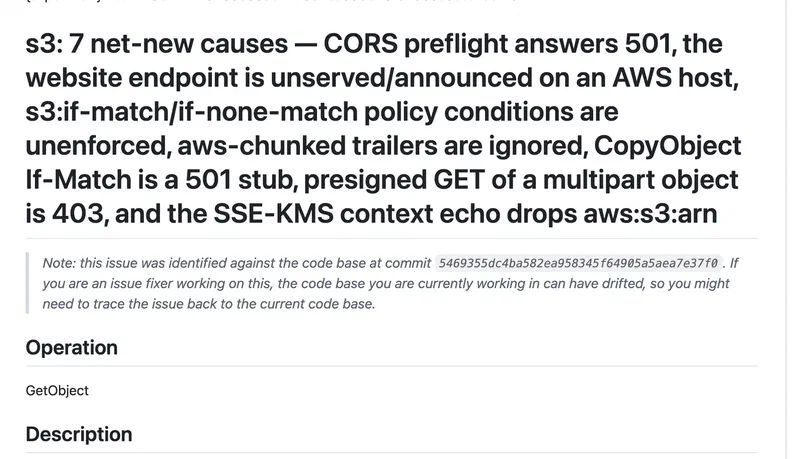
It can’t test anything a browser does yet. A CORS preflight (the OPTIONS request a browser sends before a cross-origin PUT) gets 501 Not Implemented. With authentication on, which is the default, it also refuses every unsigned request, so an anonymous download from a public bucket gets a 403 even when the policy allows it. Both gaps are already filed in the repository. The project keeps its known gaps as files under issues/things-that-do-not-work/, and on 13 November there were 6,840 of them, with 13,409 already moved to things-that-now-work/.
--auth off swaps one half for the other. With authentication off, anonymous reads work and the bucket policy is evaluated properly, so all six Patch checks pass. That’s the only setup that managed it. But presigned URLs are no longer checked either, so the upload checks fall to two. Running two emulators on different ports, one with auth and one without, covers both halves, though it’s one more thing to explain to whoever reads the CI file next.
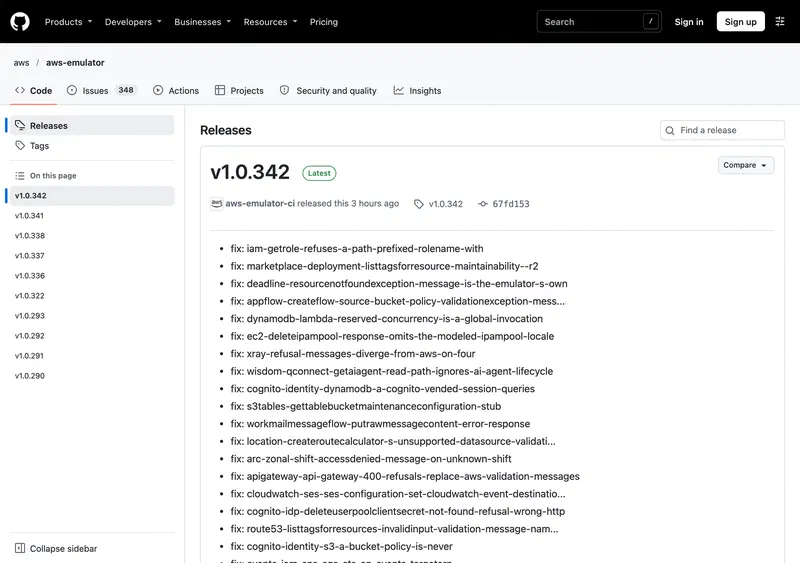
It’s moving fast. Releases v1.0.290 to v1.0.342 came out in three days, each a long list of fixes (AWS says coding agents built it, and the pace shows), and one of the 11 November fixes was “presigned GET refused with 403” in S3. Anything in my table could be different by next week, in either direction. Pin a version in CI and move it deliberately.
The Patch bucket: one policy condition that only matters on real S3#
This was the part I didn’t expect. Patch’s self-hosted bundle keeps everything in one bucket, and the policy it applies to its bundled storage is the obvious one: anyone can read, except under _internal/:
{
  "Version": "2012-10-17",
  "Statement": [
    { "Effect": "Allow", "Principal": "*", "Action": "s3:GetObject",
      "Resource": "arn:aws:s3:::example-ota/*" },
    { "Effect": "Deny", "Principal": "*", "Action": "s3:GetObject",
      "Resource": "arn:aws:s3:::example-ota/_internal/*" }
  ]
}
On Silo, signed with the admin credentials, that does what it says: strangers can’t read _internal/, and the server’s own copy from _internal/ into the public prefix (the “publish” step) goes through. On real S3 an explicit Deny with "Principal": "*" applies to everyone, including your own credentials, so the same policy would block the server’s own publish step. AWS Emulator refused that copy with a 403, which is what AWS’s policy evaluation rules say S3 does.
Patch’s maintainers clearly know this, because their example policy for AWS S3 adds one condition to the Deny:
"Condition": { "StringNotEquals": { "aws:PrincipalAccount": "YOUR_AWS_ACCOUNT_ID" } }With that line, AWS Emulator (with --auth off, so the anonymous half could be tested too) and Moto both let the worker publish while still refusing anonymous reads of _internal/. But only AWS Emulator caught the version without it. Moto, LocalStack 4.12 and Floci all let the copy through either way, so every one of them would have let me ship the broken policy. That’s the clearest argument I found for testing policies against the strictest emulator available. Copy a policy from a MinIO setup to S3 without that condition and nothing complains until the first real publish.
(My own Patch server stores bundles on Tigris, which has no bucket policies at all, so I keep _internal/ in a separate private bucket. That’s what S3_INTERNAL_BUCKET is for in Patch’s configuration. I also write paid guest posts about Patch for Codemagic. This isn’t one of them, and nobody paid for it.)
Which one I’d use now#
| Ready in | Idle memory | Image | Account | |
|---|---|---|---|---|
| AWS Emulator 1.0.342 | 0.4–0.5 s | 176 MiB | 1.67 GB (you build it) | none |
| LocalStack 4.12 | 0.9–2.2 s | 90 MiB | 1.89 GB | none for 4.12, token after |
| Moto 5.2.6 (server) | 0.7–0.8 s | 45 MiB | 560 MB | none |
| Floci 1.5.5 | 0.3–0.4 s | 11 MiB | 292 MB | none |
Measured on my Mac in Docker, three cold starts each. None of them is slow enough to matter.
For backend tests I’d start with AWS Emulator, because the mistakes it catches (permissions, signatures, Block Public Access) are the ones that otherwise only show up in production, and it’s the only one in this list that’s free, current and made by the people who make S3. Until the CORS preflight is implemented, I’d keep one small job for the browser-facing checks (the preflight, and an anonymous download from the public prefix) on Floci. LocalStack 4.12 with strict signatures passes them too, but it’s frozen and won’t get fixes. If your tests are Python and you’d rather not run a container, Moto’s in-process mocks are still the lightest option. Just don’t rely on it for presigned URL checks.
The 12 checks are short enough to write for your own buckets in an afternoon, and I’d recommend doing that before you trust any emulator, this one included. Each tool in the table failed different checks, and those are the gaps your tests would quietly pass over.