

Every image upload I’ve built has had the same tension in it. The person uploading wants the photo to go up fast. I want the server to compress it, make a thumbnail, pull a blurhash and a couple of colours out of it, drop the metadata that shouldn’t be there, and store it the way the rest of the app expects. The easy way to get my list is to send the file through the API, and that is exactly what makes their list slow.
The fast way is a presigned URL. The API signs a URL, the client PUTs the file straight to the bucket, and the bytes never touch the API at all. It’s the standard answer for good reason. But the moment you do it you’ve cut your backend out of the loop. It handed out a URL and then heard nothing. Did the file arrive? Is it the size you expected? Is it even a JPEG? Something has to tell the backend, and the usual options are all a bit sad: trust the client to call back and say “done” (clients lie, crash and lose signal), poll the bucket on a schedule (slow and wasteful), or process lazily on the first read (the first viewer pays, and you still don’t know when the file is safe to reference). This is what makes uploading directly to S3 look harder than it is. The upload is easy. The signalling is what’s missing.
Object notifications are that signal. Tigris, the S3-compatible storage I use on Fly.io, will POST a small JSON body to your app every time an object is created or deleted in a bucket. On AWS the equivalent is S3 event notifications, which usually means wiring up a Lambda, an SQS queue or EventBridge before anything reaches your code (SNS can POST to an HTTPS endpoint, but then you’re confirming subscriptions and verifying signatures first). Tigris keeps it to one HTTP request to a URL you own, which is about as simple as storage-to-backend signalling gets. The feature exists so the bucket can talk to your backend without you building a bridge for it.
This post is the whole flow: the setup, a Django endpoint that receives the events, a presigned upload that keeps every bit of server-side processing, and the gotchas (CORS, size limits, expiry, multiple files). At the end, the same signal doing back-office work, where log files landing in the bucket became Discord alerts and let me delete a cron job I’d been nursing for months.
The short answer#
In the Tigris dashboard, open the bucket, then Settings, then Object notifications. Give it an HTTPS URL on your app and pick basic auth (a username and password Tigris sends in the Authorization header; a bearer token is the other option). Add a filter so you only hear about the keys you care about. The filter is a SQL-like expression, so “only the three prefixes this post handles” is:
WHERE `key` REGEXP "^(uploads/raw|logs/api|media)/"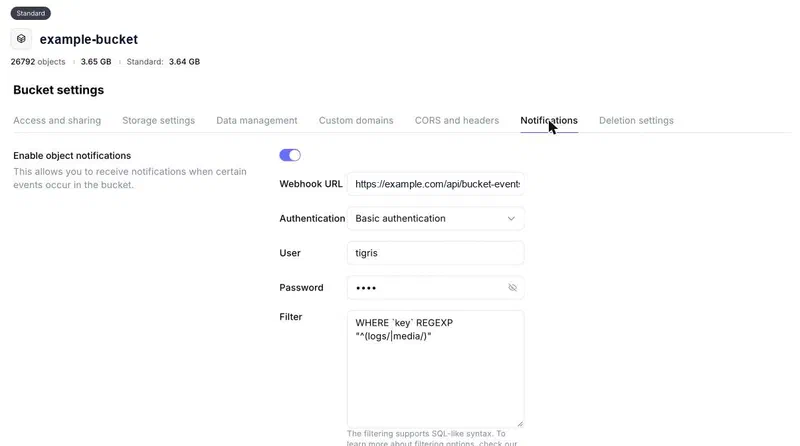
Tigris then sends a batch like this on every change:
{
  "events": [
    {
      "eventName": "OBJECT_CREATED_PUT",
      "eventTime": "2026-11-07T09:12:44Z",
      "bucket": "example-bucket",
      "object": { "key": "uploads/raw/1f3c.jpg", "size": 48213, "eTag": "9b2c…" }
    }
  ]
}
The event names you’ll meet are OBJECT_CREATED_PUT, OBJECT_CREATED_MULTIPART, OBJECT_CREATED_COPY and OBJECT_DELETED, plus rename and storage-tier transitions. Your endpoint checks the auth, routes each event by key prefix, and returns a 2xx within ten seconds. Three things to plan for from the start: delivery is at least once, so you will see repeats; events are batched, so one request can carry several; and they can arrive out of order, so don’t read “latest” off the order they came in.
A Django webhook for the bucket’s events#
The view is boring on purpose. It checks the auth, parses the body and hands each event to a router:
import base64, hmac, json, logging
from django.conf import settings
from django.http import JsonResponse
from django.views.decorators.csrf import csrf_exempt
from django.views.decorators.http import require_POST

from .bucket_events import handle, parse

logger = logging.getLogger(__name__)

def _authorised(request, secret) -> bool:
    header = request.headers.get("Authorization", "")
    if not header.startswith("Basic "):
        return False
    try:
        user, _, password = base64.b64decode(header[6:]).decode().partition(":")
    except (ValueError, UnicodeDecodeError):
        return False
    return hmac.compare_digest(user.encode(), b"tigris") and hmac.compare_digest(
        password.encode(), secret.encode()
    )

@csrf_exempt
@require_POST
def bucket_webhook(request):
    secret = settings.BUCKET_WEBHOOK_SECRET
    if not secret:
        return JsonResponse({"error": "not configured"}, status=503)
    if not _authorised(request, secret):
        return JsonResponse({"error": "unauthorised"}, status=401)
    try:
        body = json.loads(request.body or b"{}")
    except ValueError:
        return JsonResponse({"error": "invalid json"}, status=400)
    for event in parse(body):
        try:
            handle(event)
        except Exception:
            logger.exception("bucket event failed: %s", event.key)
    return JsonResponse({"ok": True})
compare_digest is there so the check takes the same time whatever you send it (on bytes, because on strings it raises for non-ASCII input, and a crafted header would get a 500 instead of a 401). If the secret isn’t set, say on a fresh staging box, the endpoint refuses everything rather than accepting everything. And a handler that throws is logged and still answered 200: Tigris retries anything that isn’t a 2xx, a retry would hit the same bug, and by then the event has been claimed (two sections down) so the retry would do nothing anyway. The log line is what gets it fixed. That assumes the failure is deterministic. A transient storage timeout consumes the event for good: the photos don’t mind, because the save can process them itself, but a log file’s alert would be lost. If that matters to you, release the claim in the except and answer 500 so Tigris retries, and accept that a real bug then retries until it’s fixed.
Routing by prefix#
Everything in the bucket is already organised by prefix, so that’s the natural way to route. Each use is one function and one line in a table:
HANDLERS = [
    ("uploads/raw/",   on_raw_photo),
    ("logs/api/",      on_api_log_file),
    ("media/",         on_media_change),
]

def handle(event):
    for prefix, fn in HANDLERS:
        if event.key.startswith(prefix):
            if claim(event):  # see below
                fn(event)
            return
Adding a fourth thing later is a new function and a new row. I like that more than I expected to.
At least once means “maybe twice”#
Tigris retries if your endpoint is slow or returns an error, and like most webhook senders it makes no promise that you’ll see an event only once. So before a handler runs, the event is claimed by (key, eTag, eventName). The eTag matters: if a file is overwritten, it’s a new version with a new eTag and should be handled again. A repeat of the same version shouldn’t.
from django.core.cache import cache

def claim(event, ttl=7 * 24 * 3600) -> bool:
    k = f"bucket-event:{event.name}:{event.key}:{event.etag}"
    return cache.add(k, 1, ttl)  # False if someone already claimed it
cache.add only sets the key if it isn’t there already, which in Redis is atomic, so two machines receiving the same retry can’t both win. I use a database-backed lease for this in the real thing because I wanted it to survive a Redis flush, but the idea is identical.
Direct-to-S3 image uploads, with the pipeline intact#
This is the part that pays for the plumbing.
Previously, picking photos for a listing meant the app held them, and when you hit Post it sent them all to the API as base64. The API resized them, made thumbnails, worked out colours and a blurhash, and only then replied. Ten photos on a slow connection was a long spinner. And a request carrying ten base64 photos is a big, slow body for an API server to hold in memory, which was quietly why I kept photos small.
Now it’s four steps, and the backend is told about every one of them.
1. The client shrinks the photo and asks for a slot#
The app still resizes on the device, to the longest edge the server keeps (1080px) as a JPEG at 0.7 quality. That resize is for the user’s bandwidth, nothing else. Then it asks the API for an upload slot:
import uuid
from datetime import timedelta
import boto3
from django.utils import timezone

s3 = boto3.client("s3", endpoint_url="https://fly.storage.tigris.dev")
BUCKET = "example-bucket"

def create_upload_slot(user):
    public_id = uuid.uuid4()
    key = f"uploads/raw/{public_id}.jpg"
    upload = PhotoUpload.objects.create(
        user=user,
        public_id=public_id,
        raw_key=key,
        expires_at=timezone.now() + timedelta(days=2),
    )
    url = s3.generate_presigned_url(
        "put_object",
        Params={"Bucket": BUCKET, "Key": key, "ContentType": "image/jpeg"},
        ExpiresIn=15 * 60,
    )
    return {
        "upload_id": str(upload.public_id),
        "url": url,
        "method": "PUT",
        "headers": {"Content-Type": "image/jpeg"},
        "expires_in": 15 * 60,
    }
The slot is a row before it’s a file. That’s what lets the server know who asked for it, when it expires, and later whether it was ever used.
2. The client PUTs straight to the bucket#
const slot = await api.post("/photo-uploads/");
const res = await fetch(slot.url, {
  method: slot.method,
  headers: slot.headers,
  body: blob,
});
if (!res.ok) throw new Error("upload refused");
// keep slot.upload_id for the save
The API never sees the bytes. This is the same from a browser, from React Native or from a native app; the only difference is that a browser needs a CORS rule on the bucket, which is in the gotchas below.
3. Tigris tells the backend, and the pipeline runs#
Within a few seconds Tigris posts an OBJECT_CREATED_PUT for uploads/raw/…, and the handler runs the same image pipeline the base64 path always used, while the person is still typing their title:
from io import BytesIO
from PIL import Image, ImageOps
from django.core.files.base import ContentFile
from django.utils import timezone
import blurhash

MAX_BYTES = 15 * 1024 * 1024

def on_raw_photo(event):
    if not event.name.startswith("OBJECT_CREATED"):
        return
    if event.size > MAX_BYTES:
        s3.delete_object(Bucket=event.bucket, Key=event.key)
        return
    upload = PhotoUpload.objects.filter(raw_key=event.key, processed_at=None).first()
    if upload is None:
        return
    data = s3.get_object(Bucket=event.bucket, Key=event.key)["Body"].read()
    process(upload, data)

def to_webp(im, longest, quality):
    im = im.copy()
    im.thumbnail((longest, longest))
    buf = BytesIO()
    im.save(buf, "WEBP", quality=quality, icc_profile=im.info.get("icc_profile"))
    return ContentFile(buf.getvalue())

def process(upload, data):
    with Image.open(BytesIO(data)) as im:
        im = ImageOps.exif_transpose(im).convert("RGB")
        im.thumbnail((1080, 1080))
        upload.width, upload.height = im.size
        upload.dominant_color = "#%02x%02x%02x" % im.resize((1, 1)).getpixel((0, 0))
        upload.image.save(f"{upload.public_id}.webp", to_webp(im, 1080, 80), save=False)
        upload.thumbnail.save(f"{upload.public_id}_t.webp", to_webp(im, 320, 70), save=False)
        upload.blurhash = blurhash.encode(im.resize((32, 32)), 4, 3)
    upload.processed_at = timezone.now()
    upload.save()
The first line of on_raw_photo matters more than it looks. The router sends every event under uploads/raw/ here, including the deletes from the orphan sweep and from the size check itself, and get_object on a key that’s gone would only raise.
So the client’s shrink was only ever for the pipe. The server still decides the format (WebP), the sizes, the thumbnail, the placeholder, and the dimensions it stores. Re-encoding through Pillow also drops the EXIF block, which is where phone cameras put the GPS position, so the privacy strip comes free. The ICC profile would go the same way, which shifts wide-gamut phone photos a touch, so to_webp passes it through. If you’d rather keep pixel-perfect originals, don’t shrink on the client; the flow is identical, the PUTs are just bigger, and bigger PUTs are precisely the thing this design makes cheap. One catch: originals from an iPhone are HEIC, which Pillow only opens with pillow-heif installed.
4. The save attaches the photos and never waits on the webhook#
When they hit Post, the request carries upload_ids instead of image data. The server looks each one up, with three outcomes:
def take(user, upload_ids):
    uploads = list(PhotoUpload.objects.filter(
        user=user, public_id__in=upload_ids, expires_at__gt=timezone.now()
    ))
    if len(uploads) != len(set(upload_ids)):     # expired, or not this user's
        raise UploadNotReadyError(upload_ids)
    for upload in uploads:
        if upload.processed_at is None:          # the webhook hasn't got here yet
            data = read_raw(upload)              # None if the PUT never landed
            if data is None:
                raise UploadNotReadyError(upload.public_id)
            process(upload, data)
    return uploads
If the notification already ran, the processed files are attached as they are. If the file is in the bucket but the notification hasn’t arrived, the save processes it inline, right there, so a post never waits on the webhook. The notification is a head start, not a dependency. And if the file isn’t there at all, or an id has expired or belongs to someone else, the save returns a validation error the app retries after a moment; the app waits for its own PUTs before sending, so in practice that’s rare.
A few details that made it hold up. The slot belongs to a user, so the server only accepts upload ids the same person created; otherwise anyone who saw an id could attach your photo to their listing. Everything falls back: if the slot request fails, the PUT is refused, or the API is an older version, the app sends base64 exactly as before. It only takes the upload path when every new photo has a slot, so a post’s pictures are all uploads or all base64, and their order stays one list. And orphans expire: people pick photos and then give up, so an upload that’s never attached expires after two days and the existing orphaned-media sweep cleans its files up.
Presigned URL upload gotchas: CORS, size limits, expiry, multiple files#
Most of what goes wrong with presigned uploads goes wrong before the notification ever fires. These are the ones I’d want on one page.
CORS, for browsers only#
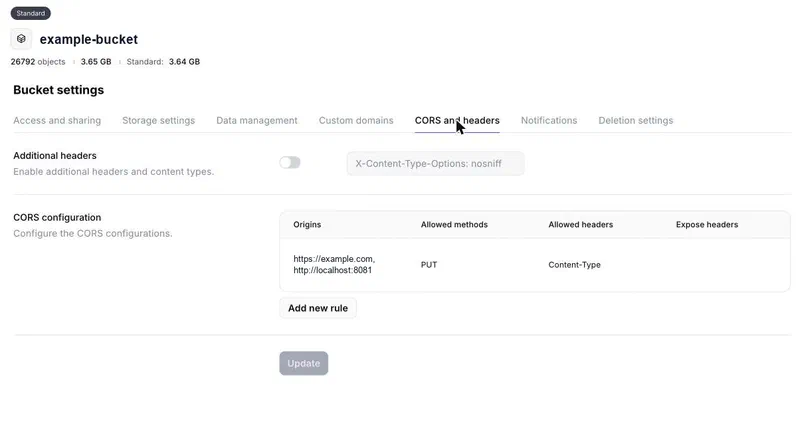
A native app doesn’t care. A browser sends a preflight OPTIONS to the bucket before the PUT, and the upload fails with a CORS error unless the bucket’s CORS rules allow PUT from your origin with the Content-Type header. Tigris takes the standard S3 CORS configuration, so the rule looks the same as on AWS. It’s the first thing to check when a presigned PUT works from curl and not from the page.
The content type is part of the signature#
Signing with ContentType means the client must send exactly that header, or the bucket answers 403 SignatureDoesNotMatch. That’s why the slot returns the headers along with the URL. Sign it on purpose, but know what it buys you: the header is enforced, the content isn’t, so a PDF labelled image/jpeg gets through. The pipeline is the real check; Pillow refuses to open what isn’t an image, and the row is never marked processed.
Size limits#
A presigned PUT URL carries no size limit. If you need a hard stop before the bytes land, a presigned POST with a content-length-range policy condition does that. I didn’t bother, because the notification carries the object’s size: the handler deletes anything over the limit before reading it, and the save-time path reads at most the limit plus one byte so it can tell. The app sends a few hundred kilobytes; anything near fifteen megabytes isn’t ours.
Expiry#
Two clocks. The presigned URL is good for fifteen minutes, which is plenty for one PUT and short enough that a leaked URL is useless soon. The slot row is good for two days, which covers someone picking photos, putting the phone down and finishing the listing tomorrow. The client treats a pending upload as stale after a day and starts a fresh one rather than hoping.
Multiple files, and bigger ones#
One slot per file. Ten photos is ten slots and ten parallel PUTs, each with its own progress (an XMLHttpRequest gives you upload.onprogress; fetch doesn’t), which you can’t get from one giant base64 POST. Past a few megabytes, use multipart (parts are 5 MiB minimum, so it’s for files well beyond that): create the multipart upload on the server, presign each upload_part, and complete it when the parts are in. Tigris sends OBJECT_CREATED_MULTIPART when the upload is completed, so the same handler fires and nothing else changes.
Out of order#
Events can arrive out of order, because the object may have been written in more than one region. For uploads it doesn’t matter: one key, one event. For a key that gets overwritten, trust the eTag and the object’s Last-Modified, not the order the webhooks reached you.
The same signal for logs: alerts to Discord#
Once the bucket can talk to the backend, anything that lands in it can be reacted to the same way, and the second thing I pointed it at was logs.
The app’s logs are shipped to the bucket as small gzipped files, one every five minutes or so per app. For most of the year a GitHub Action on a 15-minute cron read the last 20 minutes of that archive with DuckDB, found the slow-request lines, and posted a digest to Discord. On paper that’s fine. In practice GitHub’s scheduled workflows don’t run on time when the platform is busy, so “every 15 minutes” was more like “every few hours”, and when it finally ran it had a bigger window to chew through and occasionally ran out of memory. The overlap I’d added so nothing slipped between runs meant the same slow request sometimes showed up twice. It was a lot of machinery for “tell me when a request is slow”.
Now each log file is read once, as it lands. They’re a few kilobytes gzipped. The handler pulls the slow-request lines out, and if there are enough of them, or one really slow one, it posts a digest to a Discord channel through a webhook. Same for a burst of 5xx responses in one file. A Discord webhook from Python is one call:
import requests
from django.conf import settings

def discord_alert(text: str) -> None:
    requests.post(
        settings.DISCORD_WEBHOOK_URL,
        json={"content": text[:1900]},  # Discord caps a message at 2000 chars
        timeout=5,
    )
No cron, no overlap, no duplicates, and the alert arrives within a few minutes of the request instead of whenever GitHub got round to it. The Action is gone.
While each file is open anyway, I also count what’s in it (errors, warnings, health checks) into an hourly tally table. The daily summary used to scan a whole day of the archive. Now it reads a few hundred rows, and only falls back to the archive if the tally has a gap.
A guard on deletes#
This one I didn’t plan. It fell out of having OBJECT_DELETED events. When a media file is deleted, the handler checks whether any row still points at it. If one does, that’s a bug somewhere (or a person in the bucket console with a heavy finger), so it clears the column (the app shows a placeholder instead of a broken image) and reports it.
It also counts deletions per hour. Normal housekeeping removes a handful. If it ever sees a couple of hundred in an hour, I want to hear about that while it’s happening, not when users start reporting blank photos.
Things worth knowing#
Respond fast. Tigris gives each delivery ten seconds. Reading a 5 KB log file or processing one phone photo fits; anything that might take longer goes to a queue and the view returns 200, or Tigris times out and retries, and you’re back to deduplicating.
Filter at the bucket. My log shipper writes a file every few minutes per app, forever. If you only care about one prefix, say so in the notification’s filter so your app isn’t woken for everything else.
Test with a fake body. The payload is small and stable, so the tests post JSON at the view with the right Authorization header and assert what the handler did. No real storage involved.
Don’t make it load-bearing on day one. Every use here has a fallback: the save can process a photo itself, the daily summary can still scan the archive, the app can still send base64. Notifications made each of them faster and cheaper, but none of them falls over if a webhook goes missing.
The best bit of the week was deleting that workflow file. Forty lines of YAML, a Python script, two repository secrets and a recurring “why didn’t the alert fire” are gone, and the replacement is one handler that reads one small file when it arrives. The uploads were the point, though. The photos go up as fast as the network allows, the server still gets the last word on every one of them, and nobody had to build a bridge between the bucket and the backend, because the bucket now just says what happened.